
MyCG Family App Features
One app. A clearer view of care.
Explore the tools that keep approved family members informed, connected and prepared.
From the care dashboard to schedules, messages, documents and support, the MyCG Family App brings the family experience together in one secure place.
Care information in one place
Approved family access
Explore the features
Built around the full family care journey.
Choose a feature to understand what families can review and do.
Care Dashboard
Care status, upcoming care, active tasks, recent visits and alerts.
Care Plan
Notes, timeline, wellness checks, care details and observations.
Shift Schedule
Upcoming and earlier shifts, filters, caregivers and statuses.
Messages
Organized care-team conversations with read and unread views.
Family Meetings
Meeting dates, times, locations and current statuses.
Notifications
Timestamped care alerts with unread indicators.
Care Team & Recipients
Select a care recipient and review connected people.
Concerns
Submit a care-related concern and review its status.
Documents
Review, download and upload authorized family documents.
Family Access
Invite family members and configure permissions.
Getting Started
Review setup progress, checklist and account overview.
Support & Preferences
Request non-urgent support and manage notifications.
Care at a glance
Start with the information that matters now.
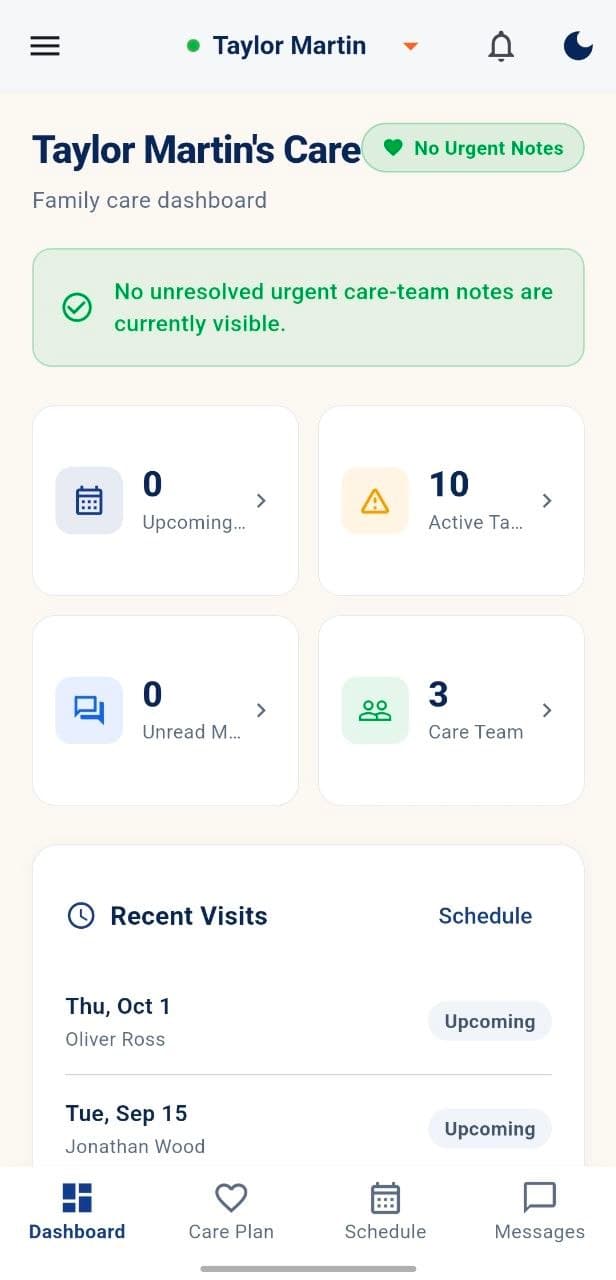
The dashboard keeps the selected care recipient in context while showing care status, upcoming care, active tasks, unread messages, care-team access, recent visits and support alerts.
Care-status banner
Summary cards
Recent visits
Quick routes to care areas
Care Plan
Review Today's Notes, Safety Notes, Timeline Events and Wellness Checks; see the client overview, care needs, written-plan status, observation areas and care timeline.
Nutrition & Hydration
Mobility & Comfort
Wellness Check-ins
Visits & schedule
See what is planned and what has already happened.
Review summary cards, filter shift records and open individual visits in the selected care recipient's schedule.
Upcoming
In progress
Completed
Care providers
Date and scheduled time
Assigned caregiver
Visible shift status
Stay connected
Messages, meetings and alerts—each in the right place.
Messages
Use All, Unread and Archived views. Review the sender, subject, timestamp and unread count, then open a conversation.
Family Meetings
Review meeting titles, dates, times, locations and status labels such as Confirmed, Scheduled and Pending. Open details or join when available.
Notifications
See timestamped alerts with unread indicators for care-plan updates, shifts, medication reminders, messages, meetings, documents and billing.
People around care
Keep the right recipient and care team in view.
Use My Patients to select the intended care recipient. Review care-team members and approved family contacts connected to that care arrangement.
Select a care recipient
Change the intended family member whose information is being viewed.
Review caregivers
See the care team connected to the selected recipient.
See family roles and access
View approved family contacts and their roles.
Raise, share & follow
Useful actions without leaving the family experience.
Concerns
Enter a title and details, choose a priority and submit. Review existing concern categories, priority, status and raised date.
Documents
Review shared file names, types and dates; download authorized files. Upload PDF, PNG, JPG or DOCX files up to 25 MB with a title and optional notes.
Support
Submit a non-urgent request using a topic, subject and message. Review request references, categories and statuses, with urgent-help guidance kept separate.
Concerns support care-related issues; Support is for non-urgent help and app or account questions.
Family access
Invite family members with controlled permissions.
Authorized users can review access summaries, invite family members, choose a role, assign individual permissions and review configured contacts.
Full name, email, optional phone and relationship
Role selection
Permissions for billing, documents, messaging, invitations, services, schedule and alerts
Configured contacts with role and status
Revoke access for a selected contact
Available actions depend on the signed-in user's role and approved access.
Setup, support & preferences
From first connection to everyday account control.
Getting Started
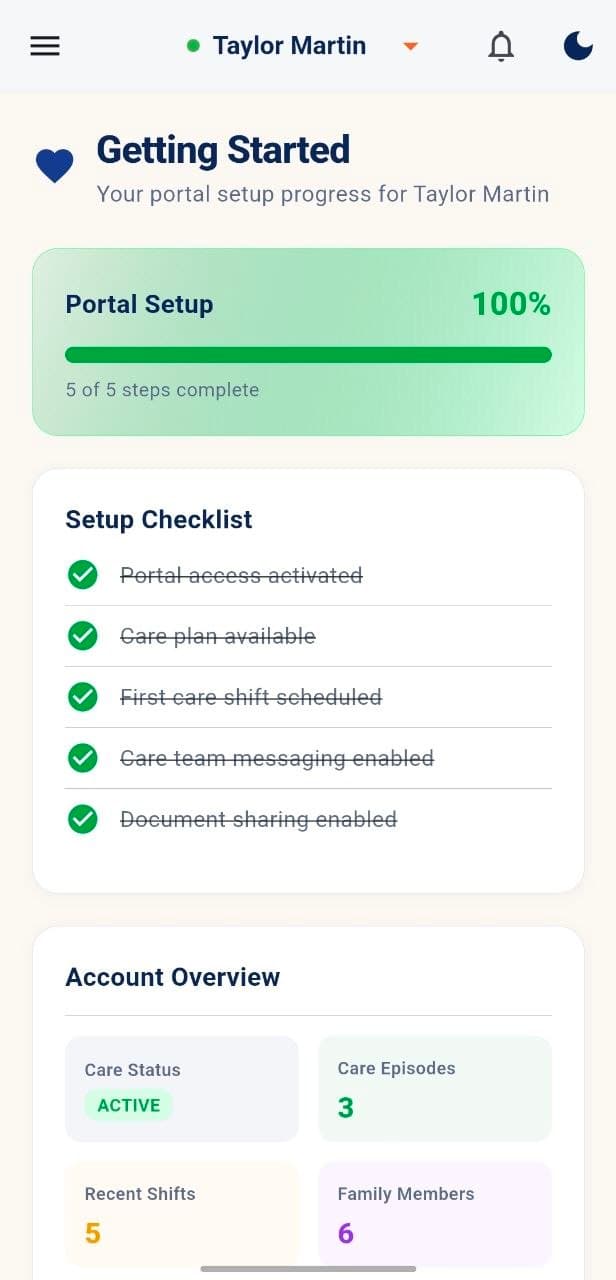
Review portal setup progress, a five-step checklist for access, care plan, first shift, messaging and document sharing, plus the account overview.
Support
See open, urgent, resolved and total-activity summaries before submitting a non-urgent support request.
Profile & Preferences
Manage Email Alerts, SMS Alerts and Portal Notifications; access Sign Out and protected account-deletion controls.
Email Alerts
SMS Alerts
Sign Out
The feature set stays focused on clear care information and approved family participation.
Informed
Organized
Permission-aware
Explore the Family App with confidence.
Learn about the app, follow the download guide or see how it connects with the wider MyCG care ecosystem.